
What to pack for a Starlink Mini trip
Start with the Mini terminal, the correct power source and cable, a suitable stand, and a case that fits your actual setup. Mini has integrated Wi-Fi, so a separate Router 3 is not required for its own Wi-Fi connection. Add network equipment only if your setup needs it.
Use the checkboxes as you prepare your bag. This is a packing checklist, not a list of items supplied with an FPVtosky case.
Hardware reference: Starlink Mini specifications. Check your own kit and accessory instructions for its exact components.
Check power and your destination before leaving
Run the Mini on the exact power source and cable you intend to take. A battery's capacity or a charger's headline wattage alone does not establish compatibility or operating time.
For the official Starlink Mini USB-C accessory, Starlink specifies a USB PD source capable of 100 W at 20 V / 5 A. Check the output of the particular port you will use. This requirement is not a claim that Mini continuously consumes 100 W. Keep the source and connections protected as required by their instructions.
Check your power bank label and USB-C output in the Mini power guide, including the distinction between DC input and the official USB-C accessory. Power reference: official Mini accessories guide.
Confirm that your service and hardware can be used at the destination. Travel, coverage and in-motion eligibility depend on the current service terms and location. Check your account and the latest official guidance before relying on the connection for a trip.
Setting up at a stop is different from operating while a vehicle or boat is moving. A carrying case does not function as a vehicle mount or enable in-motion service.
Current references: Starlink Roam and official in-motion eligibility.
At your setup location.
- Unpack the operating equipment. As an FPVtosky handling recommendation, remove the dish, required power components and cables from the transport case. Place the equipment and appropriate stand on a stable surface.
- Check the sky from the dish position. Use the Starlink app's obstruction check at the intended location and height. Trees, roof edges and poles can interrupt the view. Try another position if needed.
- Connect the correct components. Follow the setup guide for your hardware. For Mini, the official guide shows the power plug inserted fully with its face flush.
- Follow the current app prompts. Connect to the appropriate Wi-Fi network and follow any alignment or setup alerts. Check that the connection meets your needs before relying on it.
The pre-install phone scan and the obstruction map developed after operation serve different purposes. Use both according to the app's instructions; a phone scan does not promise an interruption-free connection.
Work through the Mini first setup checklist for sky scanning, alignment and the difference between Wi-Fi and internet connection checks.
How to pack Starlink Mini for the next stop
These are FPVtosky packing recommendations for the case layout you choose:
- Power down and disconnect the equipment before packing.
- Remove moisture and debris, and allow the equipment and case to dry before storage.
- Coil cables without sharp bends or tension on plugs. Keep loose accessories away from the dish surface.
- Use the matching recesses and check that a removable tray seats correctly. Avoid forcing equipment into the foam.
- Close the lid gently and check that no cable crosses the sealing surface.
These are FPVtosky packing recommendations, not a Starlink-certified packing procedure or a tested case protection rating. Mini's device rating does not establish a carrying case's rating. Starlink also states that using a standard RJ45 cable removes Mini's IP67 rating; follow the instructions for your actual connections.
Find the matching storage layoutPlan your Starlink Mini case storage layout
Make a packing list for your actual setup before choosing a case. Account for the Mini, its attached or detached stand, the exact power equipment and the full length of cable you carry. A recess shown with one accessory does not establish that a different battery or adapter will fit.
FPVtosky packing suggestions
| Storage area | What to check before closing |
|---|---|
| Mini terminal and stand | Use the shaped space intended for the terminal. Check whether your stand or adapter can remain attached in that specific insert. Keep loose or heavy objects away from the terminal surface. |
| Coiled cables and connectors | Allow room for a loose coil and the cable ends. Keep plugs out from under the terminal, power equipment and tray edges; do not force a tight bend next to a connector. |
| Power supply or battery | Compare your exact accessory's dimensions with the available compartment. Store it disconnected, follow its manufacturer's storage instructions, and avoid pressure on its ports. |
| Small parts | Give adapters and loose mounting parts a separate recess or suitable pouch where space permits. Check that they cannot shift onto the dish or plugs. |
| Tray, lid and case edge | Seat any removable layer correctly. Try closing the lid gently: nothing should need to be forced, and no cable should cross the closing edge. Check that the equipment and lining are dry. |
These are FPVtosky packing suggestions, not measured compartment dimensions or a test of your equipment. Take the operating equipment out of the transport case and its packing inserts before setup. Read the Mini connector protection guide separately for the official USB-C cable and Ethernet connection conditions.
Choose a Mini case around the equipment you carry
List the terminal, stand, power supply, cable and optional items first. Then compare the actual insert and storage layout. A case described for Mini should not be assumed to fit the larger Gen 3 / Standard kit.
FPVtosky Single-Layer Hard Case for Starlink Mini
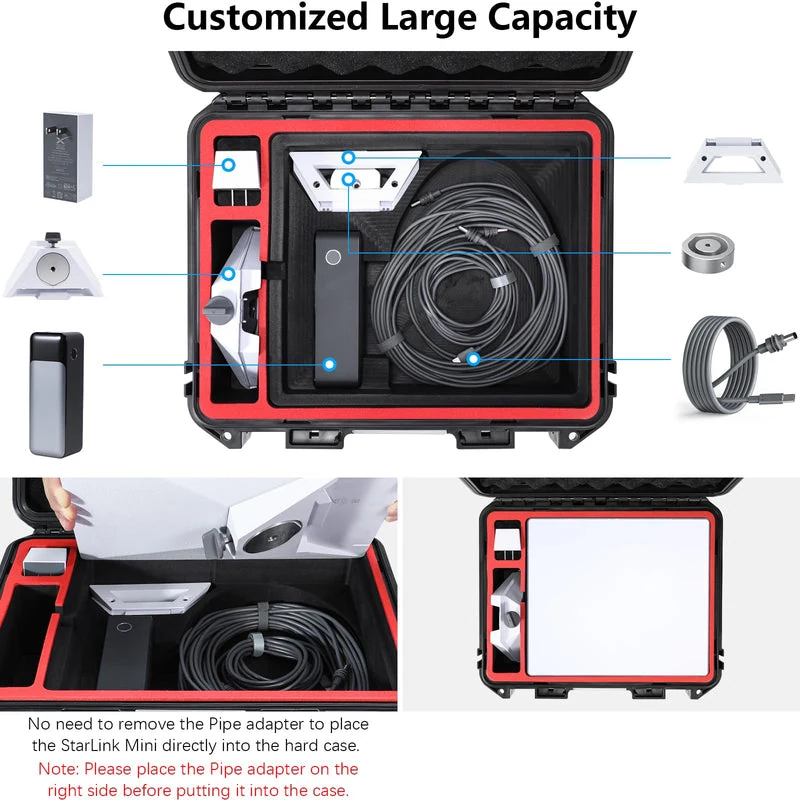
Compare this product's insert and storage arrangement with the items on your packing list. Check its current included-items section before ordering.
View layout and included itemsFPVtosky Double-Layer Hard Case for Starlink Mini - Case Only
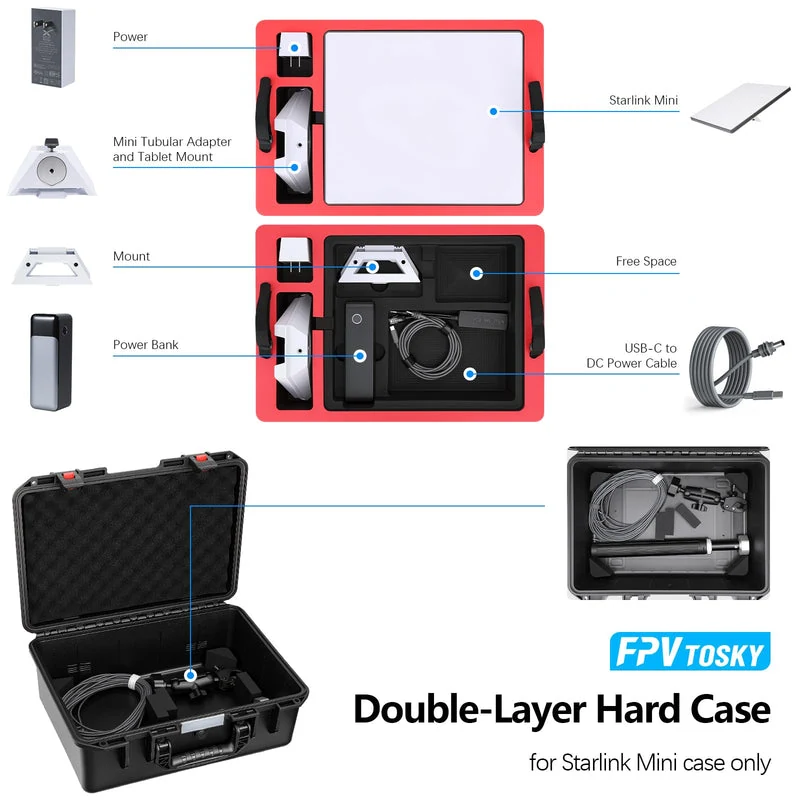
Inspect the double-layer layout when comparing space for your terminal and accessories. This listing is case only; Starlink hardware, a battery, a power supply and cables are not included.
View layout and included itemsEquipment in a layout photograph may be there to demonstrate fit. Use the included-items list to confirm what is supplied. Each product page shows its buying or email inquiry option.
Starlink Mini packing questions
Do I need to pack a separate router?
Mini has integrated Wi-Fi, so it does not need Router 3 for its own Wi-Fi connection. Bring extra networking equipment only when your particular setup uses it.
Should I leave the power cable connected in the case?
For transport, FPVtosky recommends disconnecting and arranging the cable separately so the plug is not under strain. Follow the case's layout and do not force a connected cable into a recess intended for another arrangement.
Can I run Mini inside a closed carrying case?
This guide treats the case as transport and storage. Unpack the operating equipment before setup; it does not provide instructions or approval for running Mini in a closed case.
Does buying a case include the Mini or power equipment?
Starlink hardware and service are separate. The FPVtosky double-layer Mini listing above is case only. Check the exact packing list on any other product page rather than assuming that photographed accessories are included.
Check your Starlink model or return to the Starlink cases and guides.