
Pack your Starlink Performance (Gen 3) around the equipment you actually carry: terminal, Wedge Mount, Advanced Power Supply, Router 3 and cables. Lay out the complete kit before packing, and keep the connectors clear of pressure.
The Performance Gen 3 case layout shown here is for the Performance (Gen 3) combination confirmed for this case. Performance and Standard are different hardware families; a Router 3 or the words Gen 3 alone do not identify the terminal.
By FPVtosky · Official equipment references checked 23 October 2026. The layout uses actual packing photographs; the advice below is not a transport or protection test.
What to pack for a Starlink Gen 3 trip
Use this checklist for your own equipment. It is not a list of items included with a carrying case.
Check Performance and Standard separately
Starlink lists Performance (Gen 3) separately from Standard 4 and Standard 4 X. Performance Gen 3 case is described here for the confirmed Performance combination, not for every kit sold under the Gen 3 name. Router Mini, other mounts and third-party networking equipment need their own fit check.
Plan the case layout before you pack
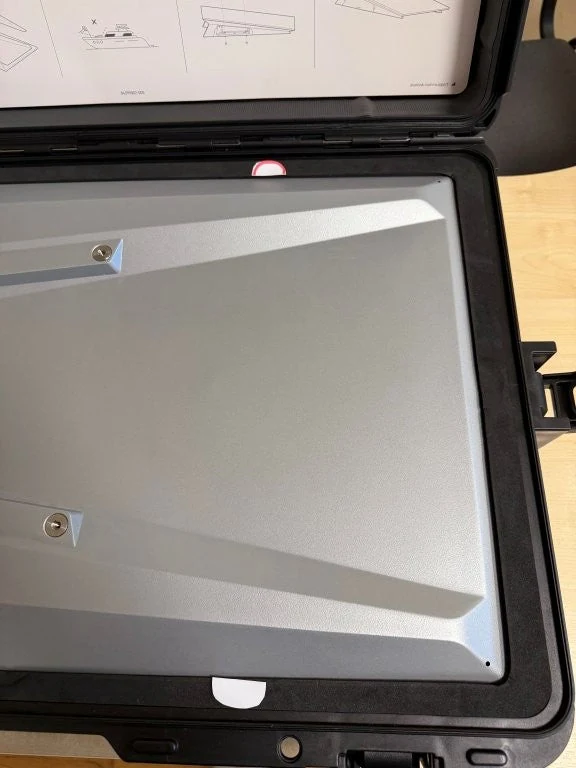
Performance Gen 3 case separates the Performance terminal from the Wedge Mount, Advanced Power Supply, Router 3 and coiled cables. Compare the whole arrangement with your equipment, including the mount and the space needed by each connector.
Official equipment dimensions
| Equipment | Official reference | Packing check |
|---|---|---|
| Performance (Gen 3) terminal | 609 × 396 × 40 mm | Compare the terminal recess and any attached hardware. |
| Performance Wedge Mount | 8° tilt; side-view drawing: 613 mm long and 119 mm high | Check the complete mount profile and whether it is packed separately. |
| Advanced Power Supply | 310 × 180 × 40 mm | Allow additional room for the cables and plugs. |
| Router 3 | 298.6 × 120.4 × 43.4 mm in the router specification table | Confirm the actual router version and any attached mount. |
The Performance kit's 686 × 454 × 121 mm figure is its shipping-package size, not the antenna size or usable case space. Official equipment dimensions help identify the parts; compartment depth and lid clearance still need checking with the loaded case.
Terminal and power supplyWedge Mount referenceRouter 3 specification table
| Storage area | What to check |
|---|---|
| Terminal and Wedge Mount | Use the terminal layer and the mount position shown. Check that the terminal rests evenly, with no loose parts pressing against it. |
| Router | The confirmed combination uses Router 3. Do not assume that Router Mini, a router mount or third-party networking hardware shares the same fit. |
| Power equipment | Use the Advanced Power Supply position. Keep its plugs clear of the terminal and any removable part of the insert. |
| Cable coil | Make a relaxed coil that fits the compartment. Keep connectors visible and free from pressure; do not force the cable into a sharp bend beside a plug. |
| Small parts and lid | Separate loose adapters and fasteners where space permits. Close the lid gently and check that no cable crosses the closing edge. |
What to confirm for Performance Gen 3 case
The product page lists the current case dimensions, net weight and included items. Compare the separate compartment shapes and lid clearance with your equipment. IP67 is the specified case protection rating; it does not establish a drop or load test for the kit you pack.
View Performance Gen 3 case layout and included items Check my equipment list
The product page provides the current case specifications and purchasing or inquiry options.
Pack cables without loading the connectors
Before packing, FPVtosky recommends switching off the power source, disconnecting the equipment, removing moisture and debris, and allowing the case and equipment to dry. Arrange the cable separately so its connectors are not trapped under the dish, router or lid.
Follow the release method for your actual cable. For the Performance terminal connection, Starlink describes turning the connector collar counterclockwise before pulling it out. This is different from a latching Ethernet plug. Check the correct setup guide rather than pulling an unfamiliar connector.
Before closing the case, check three things: the cable coil sits freely, no plug carries the weight of another item, and the lid closes without force. These are packing recommendations; the photograph does not confirm connector clearance for your own cable bundle.
Set up at your next stop
- Unpack the operating equipment. Use Performance Gen 3 case as transport and storage. FPVtosky recommends taking the dish, router, power equipment and required cables out of the case and packing insert before use.
- Choose the dish position. Use the Starlink app to check the intended sky view, then follow your hardware's setup and alignment instructions.
- Connect your tested setup. Keep the power equipment and connections in conditions permitted by their instructions. Do not treat a case as an operating enclosure.
- Check the connection before relying on it. Review the app's status and alerts, connect your devices and test the work you need to do.
Check your account, destination and current service conditions before travel. This guide describes packing and setting up at a stop; a carrying case is not a vehicle mount and does not establish eligibility for use while moving.
Setup and sky-view instructionsCurrent Starlink travel service information
Gen 3 travel and storage questions
Does Performance Gen 3 case fit every kit called Gen 3?
The confirmed combination is the Performance (Gen 3) terminal, Wedge Mount, Advanced Power Supply, Router 3 and the cables shown. This does not establish fit for Standard 4, Standard 4 X, older Performance terminals, other mounts or every optional cable length.
Can I leave the cables connected during transport?
FPVtosky recommends disconnecting and packing the cables separately to avoid pressure on the plugs. Confirm the insert layout and clearances rather than forcing a connected cable under the lid.
Does Performance Gen 3 case include the dish and router?
No. The listing is for the case and fitted insert only. The dish, router, power supply, stand, cables and other illustrated equipment are not included.
Can I run the equipment inside a closed case?
This guide uses the case for transport and storage. Unpack the operating equipment before setup; the published information does not establish Performance Gen 3 case as an approved operating enclosure.
Compare Starlink case layouts Identify your Starlink kit
Travelling with Mini instead? Use the separate Starlink Mini packing checklist.